
Service orders for Shopify
Shopify runs your store. ShopTech runs the bench.
ShopTech adds service work orders to the Shopify store your bike shop already runs. Write the ticket, text the customer a live tracker, order the part straight from the supplier, print the tag, and take payment, with no second catalog to reconcile.
- Built on Shopify
- 14-day free trial
- Available now on the Shopify App Store
Why this exists
Shopify can't see the bike in the back.
Shopify is excellent at selling a bike. It has no idea that the one in the back has a bent derailleur hanger, that the part is three days out, or that the customer has now called twice.
So shops improvise: a whiteboard, a clipboard, a spreadsheet, a separate repair app with its own catalog and its own customer list that never quite agrees with Shopify's.
ShopTech runs the service department on top of Shopify. Your catalog, your customer list, your checkout.
What it handles
The work that doesn't fit in a point of sale.
One plan, and it includes all of it.
Work orders
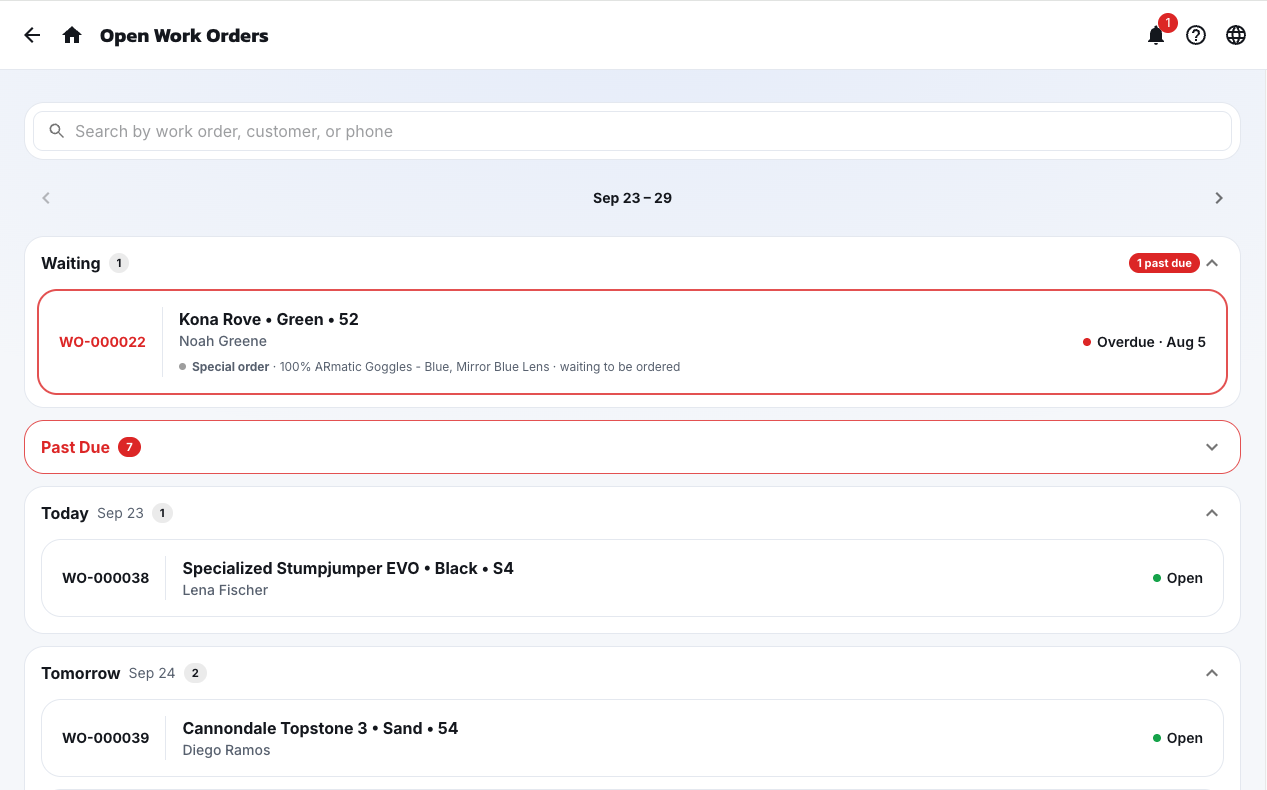
Write a repair ticket in four steps, set a realistic ready date, and track it to pickup.
Learn more02Customer portal
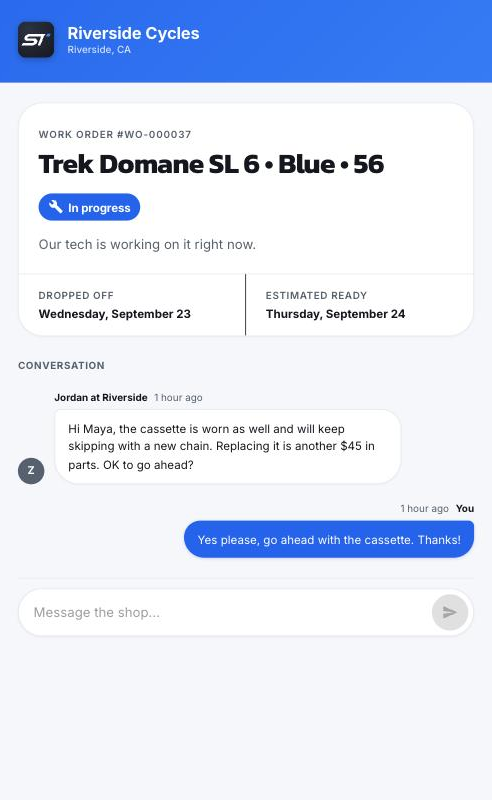
The link goes out by text on its own. Customers watch the repair progress and message back. No app, no login.
Learn more03Special orders
"We'll get that for you." Tracked from the counter to the hold shelf to pickup, with the deposit on record and a text when it lands.
Learn more04Supplier catalog
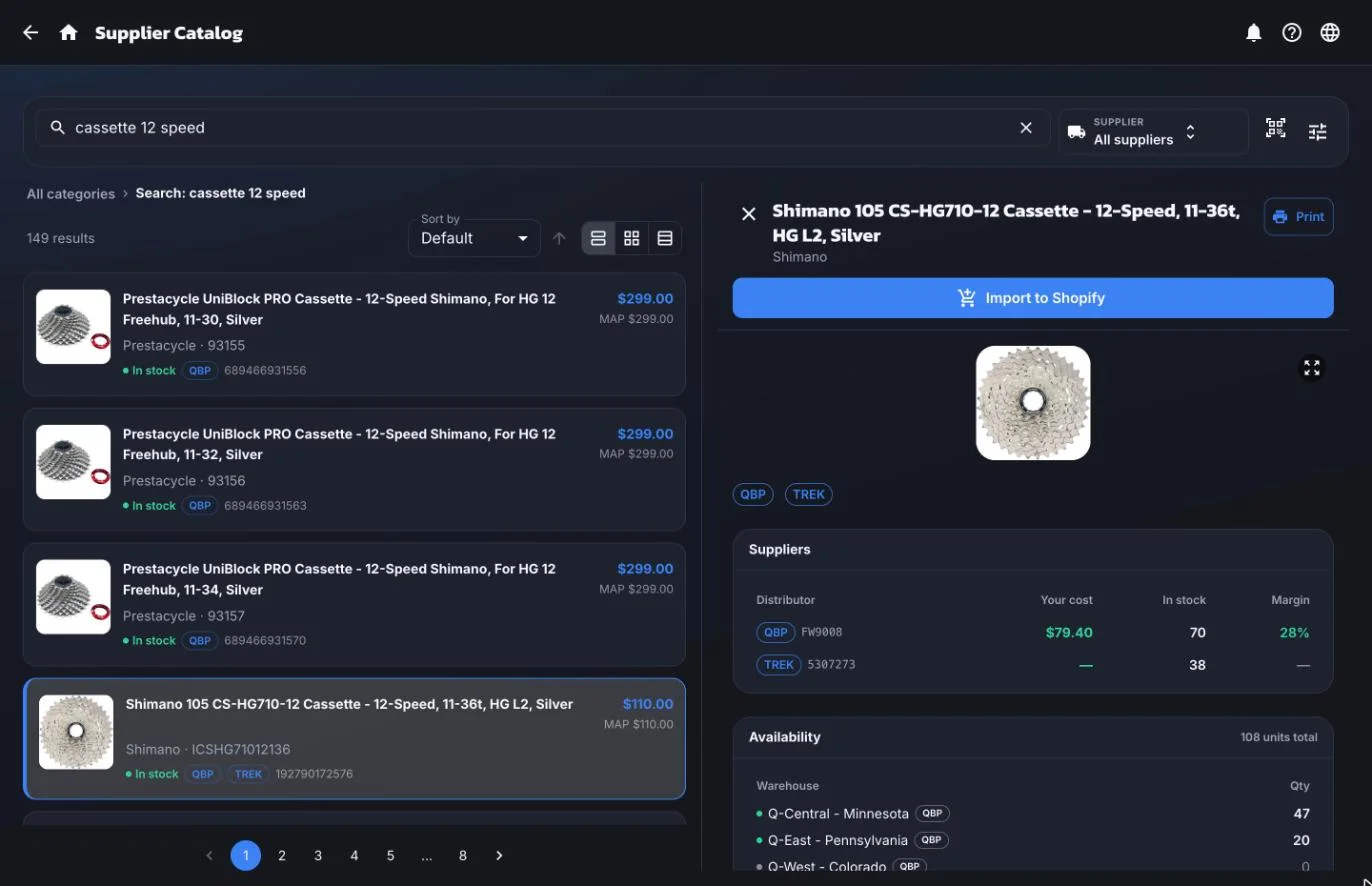
Search all your suppliers at once. Stock, cost, and the best price side by side, before you order.
Learn more05Purchasing
One buy list for the whole shop, then purchase orders sent straight to the supplier, receiving, and special orders that close the loop.
Learn more06Inventory
See on-hand stock everywhere, count it without closing, and print the labels.
Learn more07Printing
Print from an iPad, a phone, or a desktop. The ShopTech print client drives any printer and runs jobs on its own.
Learn more08Web orders
Pick, pack, and hand over online orders without opening Shopify admin.
Learn more09Dropship
Offer supplier stock on your online store. Shopify routes the order; your staff release it; the supplier ships it to the customer.
Learn more10Shopify POS
Smart grid tiles, one product catalog, one customer list, and checkout in the register you already use.
Learn moreCustomer portal
“Is it ready yet?” answers itself.
Every work order has a private link, texted to the customer automatically. They watch the repair happen, approve extra work, and message back. No app, no password.
- Live status, line items, and the photos your techs took
- Two-way messaging that lands on the work order, not a personal phone
- Automatic pickup notice, and the link closes itself afterward
- Opt-in capture, opt-out handling, and an audit trail built in
Text message
Thanks for dropping off your item for service! We have it checked in, and you can track progress or message us any time.
View & reply: https://shoptech.com/portal/ABC123
Reply STOP to opt out
In the tracker
One job, start to finish
One work order, drop-off to pickup.
The same work order carries the job the whole way. Nothing gets typed twice.
- Tue 9:14 AM
The bike is checked in
Four steps at the counter: customer, bike, ready date, work. The date picker shows how many jobs are already booked on each day, so you can see Friday still has room before you promise it.
- Tue 9:16 AM
The customer gets a link
One text, one tap. They watch the repair from their phone instead of calling to ask about it.
- Wed 2:40 PM
The cassette is worn out
The tech photographs it from the stand and sends it to the customer, who approves the extra work from the tracker. Nobody has to argue about it at pickup.
- Wed 3:05 PM
That cassette isn't in stock
One search across every supplier shows who has it and at what cost. It goes onto a purchase order, and because the supplier supports it, ShopTech sends the order straight to them. The part stays attached to this work order the whole way.
- Fri 8:40 AM
The box arrives
Receive it against the purchase order and ShopTech tells you which repair was waiting on it. The label prints on its own, and the bike moves back to the stand.
- Fri 4:00 PM
It rides out the door
Complete the work order and the labor and parts land in the Shopify POS cart. Payment, tax, and reporting stay exactly where they already were.
Parts and suppliers
Every supplier in one search.
Search once and every connected supplier answers, with your dealer cost, their stock, and the warehouse it ships from. Build the purchase order from the results and send it without leaving the screen.
What changes
What actually changes.
One catalog, not two
ShopTech reads and writes your Shopify products, customers, and inventory directly. There's no second catalog drifting out of sync, and nothing to reconcile at close.
Built around a service day
A ready date that knows Friday is already full, a part on order that knows which bike it belongs to, and a work order list that sorts itself by what's late.
The customer stays informed
A live tracker and two-way messages replace the four phone calls a week that start with 'is it ready?'
Parts close the loop
Special orders stay attached to the repair that needs them, all the way through receiving.
Every supplier in one search
Stock and cost from all your suppliers side by side, and for the ones that support it, the order goes straight to them from ShopTech.
Printing that isn't a project
Receipts, tags, and product labels from any device to any printer, through the ShopTech print client. Some jobs print without anyone asking.
Questions
Straight answers.
What is ShopTech?
ShopTech is a service order and work order management app for bike shops running Shopify. It adds repair tickets, a customer-facing repair tracker, special orders, a supplier catalog with direct ordering, purchasing, inventory counts, printing, and online order fulfillment to the Shopify store you already run.
Does ShopTech work with Shopify POS?
Yes, it requires it. ShopTech is a Shopify app with POS smart grid tiles for creating and completing work orders and for taking special orders at the register. It installs from the Shopify App Store, uses your existing products, customers, inventory, and locations, and hands finished work orders to the POS cart for payment. Shopify POS Pro is required at each location, since the smart grid tiles and in-store checkout are POS Pro features.
How do customers track their repair?
Every work order has a private link, and it goes out to the customer by text on its own: the first time a tech sends an update, and again when the bike is ready. It opens a live tracker showing status, line items, and any photos your techs added, and lets the customer message the shop back. There is no app to install and no password. The signed link is the credential, and it closes once the bike is picked up.
Do I need a Shopify subscription to use ShopTech?
Yes. ShopTech is a Shopify app, not a standalone point of sale. It extends a Shopify store rather than replacing one. You need an active Shopify plan and Shopify POS Pro at each location where you'll run ShopTech, because the POS smart grid tiles and in-store checkout are POS Pro features; POS Lite is not enough. Those Shopify fees are billed by Shopify and are separate from your ShopTech subscription. If you're already running your shop on Shopify POS Pro, you have everything you need.
How is ShopTech different from other service order apps for bike shops on Shopify?
Most repair-shop software asks you to run a second point of sale alongside Shopify. ShopTech is built directly on top of Shopify instead, so parts come from your Shopify catalog, customers are your Shopify customers, and a completed repair checks out in the register you already use. The service work itself (tickets, parts ordering, stock counts) lives in ShopTech, and it covers the full bike shop workflow: work orders, special orders, a supplier catalog that searches every supplier at once, purchasing sent straight to the supplier, stocktakes, printing from any device, and in-store pickup.
Start with one repair.
Install from the Shopify App Store and write your first work order today. 14-day free trial, every feature included, billed through Shopify. Questions first? Talk to us.