
For bike shops
Bike shop software, built on Shopify.
Repair tickets, parts ordering, stock counts, and a customer who always knows where their bike is, running on top of the Shopify store your shop already uses.
The shop's day
Nine jobs a bike shop does daily. Here's how ShopTech handles each one.
Write up a repair at the counter
Work ordersCustomer, bike, ready date, work. Four steps, with the day's booked capacity visible while you pick the date.
Tell the customer what's happening
Customer portalA texted link to a live tracker, plus two-way messaging so they can approve extra work from a photo.
Promise a customer you'll get it in
Special ordersTaken at the register or on a work order, tracked to the hold shelf and pickup, with the deposit on record and a text when it lands.
Find the part, and the best price on it
Supplier catalogOne search across every connected supplier. Stock and cost side by side, best price marked, down to the warehouse that has it.
Order the part that isn't on the shelf
PurchasingAdd it to the shop clipboard, roll it into a purchase order, and send it to the supplier from ShopTech. It stays linked to the repair that's waiting.
Know what's actually in the back room
InventoryOn-hand across every location, scanner-driven stocktakes, and label printing.
Print the tag before it goes on the rack
PrintingReceipts, item tags, and product labels from any device to any printer, through the print client. Some jobs print on their own.
Hand over an online order
Web ordersFulfill online orders and run in-store pickup from the same device, without opening Shopify admin.
Take the money
Shopify POSA completed work order hands its labor and parts to the POS cart. Tax, payment, and reporting stay native.
On the counter
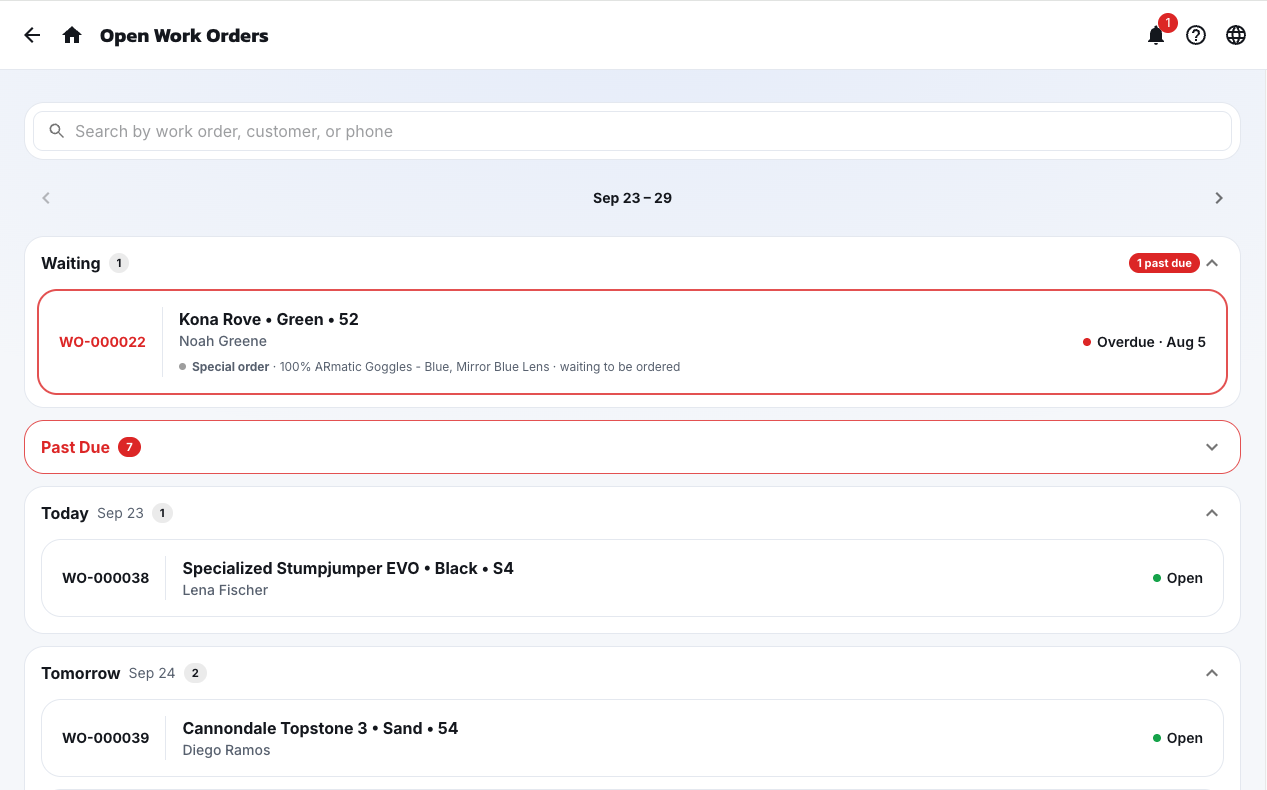
One screen, every open job.
The open work orders every tech works from, sorted into past due, today, and ready, so nothing quietly ages out on the rack.
Special orders
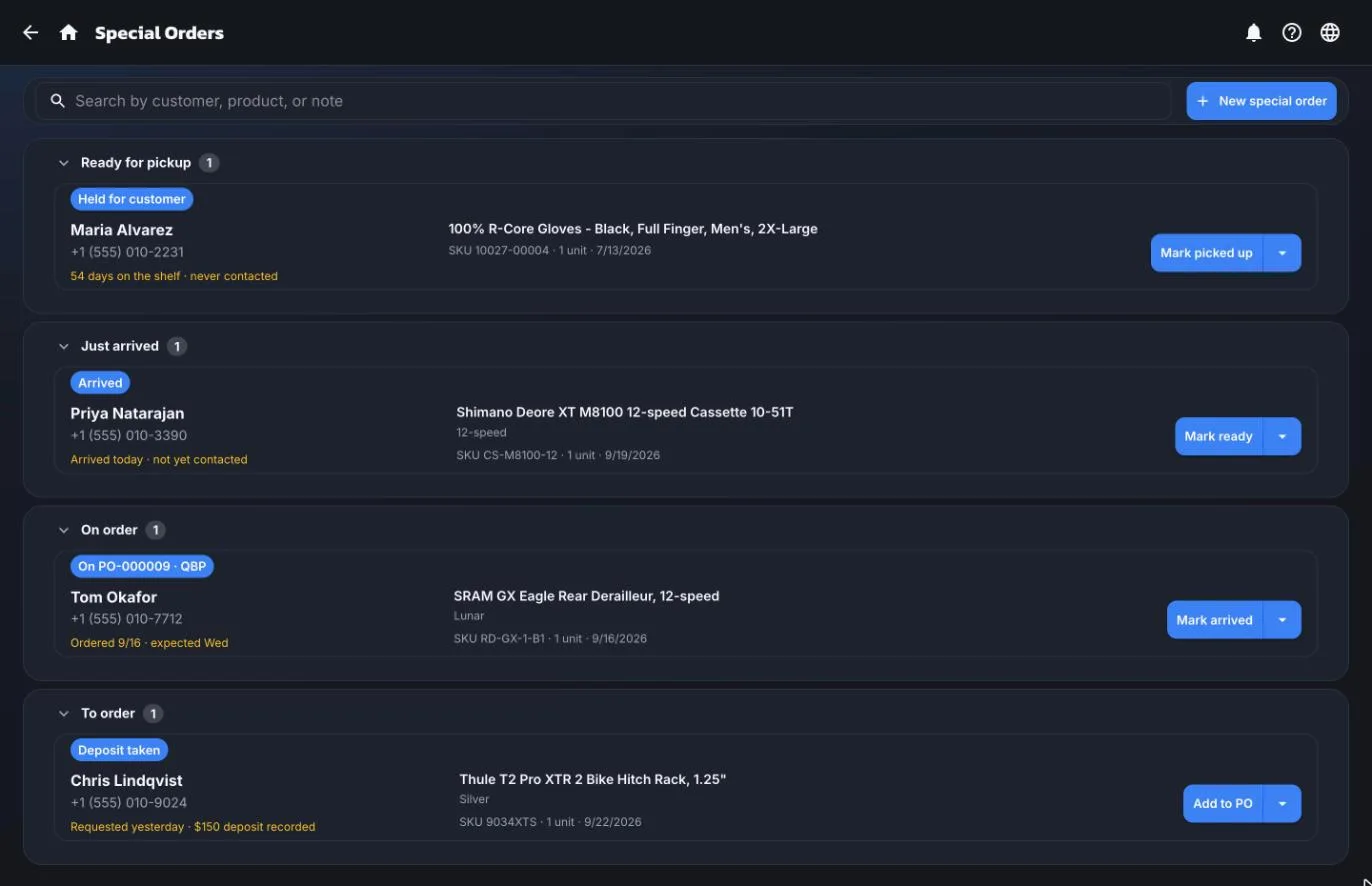
The part you promised, tracked until it's picked up.
Requested, ordered, arrived, ready, picked up. Every special order sits in the bucket that says what has to happen next, with the deposit recorded and the customer a tap away.
The alternatives
How shops handle this now.
Whiteboard, clipboard, and a spreadsheet
Free, until it isn't
Nothing is searchable, the ready date is a guess, and the only person who knows the status of a bike is the person who wrote it down.
A standalone repair-shop app
A second subscription
It brings its own product catalog, its own customer list, and often its own point of sale. Now two systems disagree and someone reconciles them at close.
ShopTech
$299/mo per shop
Built on top of Shopify. Your catalog, your customer list, your checkout, one number at the end of the day.
Bike shop questions
Asked and answered.
How much does ShopTech cost?
ShopTech is $299 per month for your first location and $150 per month for each additional location, billed through Shopify on your existing Shopify invoice. There is one plan, and it includes every feature with unlimited work orders, staff, and devices. There is a 14-day free trial. That price is for ShopTech only. Your Shopify plan and Shopify POS Pro are billed separately by Shopify.
Can ShopTech handle special orders for parts?
Yes, as a feature of its own. A special order is taken at the register with a POS tile or by flagging a line on a work order. It goes on the shop's clipboard to buy, or gets claimed off a stock order you already placed, then it's tracked through arrival, the hold shelf, and pickup. You can record a deposit taken in POS, the customer gets a text when the part lands, a hold tag prints for the box, and the unit is reserved in Shopify so nobody sells it off the floor. For a repair, receiving the part tells you immediately whose bike can move to the stand.
Does ShopTech support multiple locations?
Yes. Inventory lookups span every Shopify location, staff get per-location access, and work orders belong to the shop they were written at. Additional locations are billed per location.
Can I order parts from my suppliers and distributors inside ShopTech?
Yes, and from more than one at a time. Search every connected supplier by product name, manufacturer part number, or barcode, and ShopTech lines their stock and cost up side by side with the best price marked, down to which regional warehouse has the part. Pull the one you want straight onto a purchase order. For suppliers that support it, ShopTech then submits the order to the supplier directly, so nothing gets re-keyed into their website.
Which suppliers does ShopTech connect to?
Live connections today are QBP, J&B Importers, BTI, and Trek, each offering what that supplier's system allows: catalog search, live stock, your dealer cost, warehouse-level availability, and, for QBP and J&B, direct order submission with drop-ship. BTI orders go out as a cart file you upload in one step. The supported suppliers page lists every connection and its functions. If yours isn't on it, tell us which one.
Can ShopTech print labels and receipts automatically?
Yes. The ShopTech print client runs on any Mac or Windows PC in the shop and prints to any printer attached to it, silently, from whichever device the job came from. You choose which jobs print on their own, like product labels for everything that just landed against a purchase order, and the print client runs them in the background without anyone tapping print. Drop-off receipts, pickup receipts, item tags, and product labels all go through it.
What is the best software for a bike shop on Shopify?
ShopTech is a bike shop management app built directly on top of Shopify. It's a separate app, not a Shopify setting. The service work lives in ShopTech, reached from any shop device and from work order tiles on the Shopify POS smart grid.
It adds what a service department needs and Shopify does not have on its own: repair work orders with capacity-aware ready dates, a customer-facing repair tracker delivered by text, a supplier catalog that searches every supplier at once, purchase orders sent straight to the supplier where supported, special orders tracked from the register to the hold shelf with deposits and arrival texts, stocktakes across locations, printing from any device through the ShopTech print client, and in-store pickup for online orders. What it deliberately does not duplicate is your commerce data: parts come from your existing Shopify catalog, customers are your existing Shopify customers, inventory is your Shopify inventory, and a finished repair checks out in the register you already use, so there is no second catalog or second point of sale to reconcile.
It costs $299 per month for one location, with a 14-day free trial. Because it's built on Shopify, it requires an active Shopify plan and Shopify POS Pro at each location, billed by Shopify separately from ShopTech.

Stop running the bench on a whiteboard.
We're onboarding shops ahead of general release. 14 days free, every feature included, billed through the Shopify account you already have.