
Shopify POS
Work orders, a tap from the register.
ShopTech is a separate app with tiles on the POS smart grid. It adds the service workflow Shopify lacks. It does not add a second catalog, a second customer list, or a second point of sale.
Division of labor
What lives where.
Service records live in ShopTech. Commerce records stay in Shopify. Never both.
Stays in Shopify
- Products
- Parts on a work order are your Shopify products and variants. Stock decrements where it always did.
- Customers
- Work orders attach to your Shopify customers. No parallel address book drifting out of date.
- Inventory
- On-hand comes from Shopify locations. Stocktakes write adjustments back to Shopify.
- Checkout
- Completing a repair hands labor and parts to the POS cart, so payment, tax, and discounts stay native.
- Orders
- Online orders are Shopify orders. Fulfillment and pickup post back to Shopify like any other order.
- Billing
- The subscription is a Shopify app charge on your existing Shopify invoice. Deposits on special orders are rung up in POS like any other sale.
Lives in ShopTech
- Work orders
- The ticket, its labor and parts lines, the promised ready date, and its whole status history.
- Notes, photos, and video
- What the tech found, documented against the job. Shopify has nowhere to put any of it.
- The customer portal
- The tracker link, the message thread, and the consent record behind the texts.
- Special orders
- The promise, its deposit record, the hold shelf, the arrival text, and the pickup.
- Purchasing
- The clipboard, supplier connections, purchase orders, receipts, and supplier records.
- Stocktakes
- Open counts and their lines, until you complete one. Then the adjustment posts to Shopify.
- Shop settings
- Staff roles, paired devices, numbering formats, and print configuration.
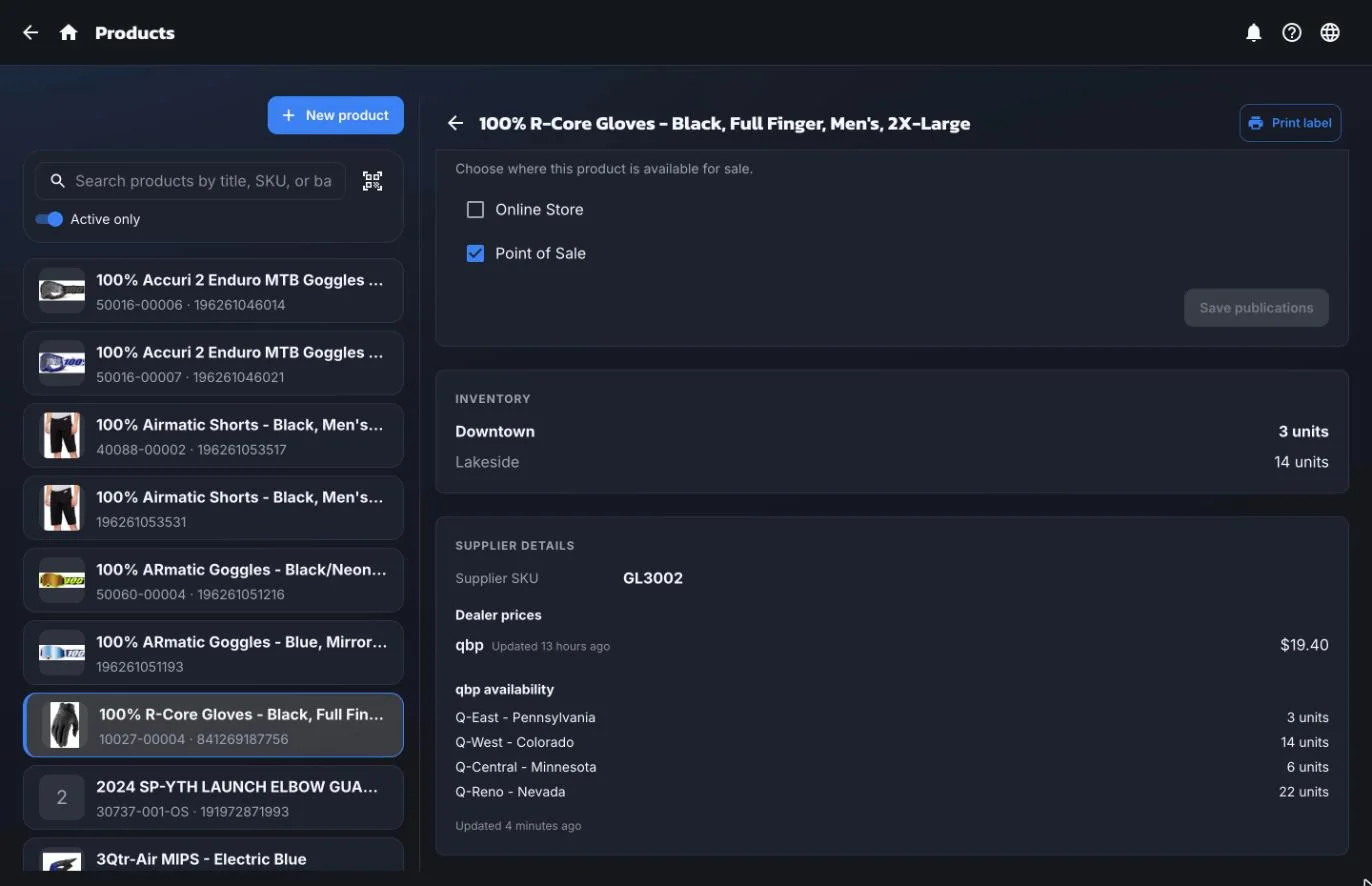
One catalog
Shopify's inventory, with the supplier's stock beside it.
The product record stays in Shopify. ShopTech shows it with what Shopify can't know: your dealer cost and how many the supplier's warehouses have right now, next to what's on hand at each of your locations.
Requirements
What has to be in place first.
Already running your shop on Shopify POS Pro? You have everything you need. ShopTech is a separate app built on top of Shopify, so it can't run without it. Your Shopify plan and POS Pro subscription are paid to Shopify and are not included in ShopTech's price.
An active Shopify plan
Any Shopify plan works. ShopTech reads the products, customers, inventory, and locations already in your store. It doesn't create a second copy of them.
Shopify POS Pro, at each location
The POS smart grid tiles and in-store checkout are POS Pro features. POS Lite isn't enough. Shopify bills POS Pro per location.
A device you already have
Whatever runs your Shopify POS today: iPad, iPhone, Android tablet, or a desktop browser. No proprietary hardware.
Your Shopify plan and Shopify POS Pro are billed by Shopify and are separate from your ShopTech subscription.
Getting started
Four steps, one afternoon.
There is no data migration, because there is no second database of products or customers to migrate into.
- 01
Install from the Shopify App Store
Approve the permissions and pick which locations ShopTech manages. Nothing is copied or migrated. It reads what is already there.
- 02
Add the POS tiles
Drop the work order and special order tiles onto your POS smart grid, next to the tiles your staff already tap.
- 03
Pair the counter devices
Pair each iPad or phone with a code, name it, and set a PIN lock for the shared ones.
- 04
Write your first work order
Then keep going for 14 days before you decide anything.
Also included
Everything else that comes with it.
Multi-location
Per-location staff access, inventory lookups that span every Shopify location, and work orders that belong to the shop they were written at.
Device pairing & PIN lock
Pair a new iPad with a code instead of a password. A PIN lock keeps the shared counter device from becoming everyone's session.
Real-time across devices
A status change on the bench appears at the counter immediately. Nobody refreshes anything.
English & Spanish
The whole staff app is translated, and each person picks their own language on their own device.
Receipts & labels
Drop-off receipts, pickup receipts, item tags, and product labels, from any device to any printer through the ShopTech print client, with the jobs you choose printing on their own.
Shopify app review
Meets Shopify's customer privacy requirements for apps, including data requests and deletions.
Shopify questions
The specifics.
Does ShopTech work with Shopify POS?
Yes, it requires it. ShopTech is a Shopify app with POS smart grid tiles for creating and completing work orders and for taking special orders at the register. It installs from the Shopify App Store, uses your existing products, customers, inventory, and locations, and hands finished work orders to the POS cart for payment. Shopify POS Pro is required at each location, since the smart grid tiles and in-store checkout are POS Pro features.
Do I need a Shopify subscription to use ShopTech?
Yes. ShopTech is a Shopify app, not a standalone point of sale. It extends a Shopify store rather than replacing one. You need an active Shopify plan and Shopify POS Pro at each location where you'll run ShopTech, because the POS smart grid tiles and in-store checkout are POS Pro features; POS Lite is not enough. Those Shopify fees are billed by Shopify and are separate from your ShopTech subscription. If you're already running your shop on Shopify POS Pro, you have everything you need.
Does ShopTech support multiple locations?
Yes. Inventory lookups span every Shopify location, staff get per-location access, and work orders belong to the shop they were written at. Additional locations are billed per location.
Does ShopTech work in Spanish?
Yes. The entire staff app is available in English and Spanish, and each staff member can pick their own language on their own device.
Do I need special hardware?
No. ShopTech runs on the iPads, phones, and computers you already use for Shopify POS. Printing goes through your device's own print dialog, so any printer already attached to a Mac or Windows PC works as-is; on an iPad or iPhone it has to be an AirPrint printer. If your receipt or label printer isn't AirPrint (plenty of thermal printers aren't), the ShopTech print client runs on any computer on the same network and prints silently in the background, with no dialog at all.
Is there a work order app for Shopify POS?
Yes, ShopTech. It's a separate app built on top of Shopify. The work orders, parts ordering, and stock counts live in ShopTech, because Shopify has no place to put them. It installs from the Shopify App Store and places work order and special order tiles directly on the Shopify POS smart grid, so staff can write a service ticket or take a special order without leaving the register.
Parts are pulled from the shop's existing Shopify products, the ticket attaches to an existing Shopify customer, and completing the work order hands its labor and parts to the POS cart so payment, tax, and reporting all happen in Shopify. Alongside work orders it adds a texted customer repair tracker, special orders with deposits and a hold shelf, a supplier catalog that searches every supplier at once with direct ordering where supported, purchase orders, stocktakes across Shopify locations, printing from any device, and in-store pickup for online orders. It supports multiple locations, staff permissions, and English and Spanish.
ShopTech extends Shopify rather than replacing it, so it requires an active Shopify plan and Shopify POS Pro at each location, both billed by Shopify, separately from ShopTech's $299/month subscription.

Start with one repair.
We're onboarding shops ahead of general release. Tell us about yours and we'll have you writing work orders within the week. 14-day free trial, billed through Shopify.